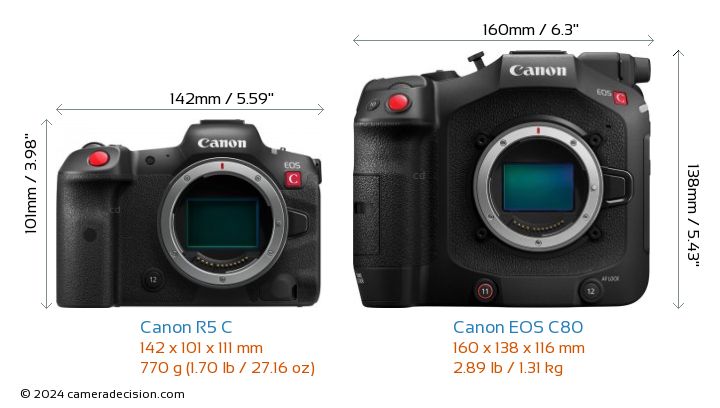
 Canon EOS R5 C vs C80
Canon released firmware updates for its EOS R5 C, and EOS C80 cinema line full-frame cameras with RF mounts. Updates improves the accuracy of the timecode in certain conditions, and it also covers the major changes that came with previous firmware updates.
You can find the download links and installation instructions below:
Firmware Notice: EOS R5 C: Firmware Version 1.1.0.1
1. Enables functions to be used without limitation in conjunction with the new Battery Pack LP-E6P. This makes it possible to shoot 59.94P with RAW LT.
2. Enables the display of the digital tele-converter icon on [Main Recording Displays] of [DISP Level 2].
3. Adds the ability to apply Full-Screen display to an external display according to OSD Output setting when using [Peripheral Border Display].
4. Adds function [Tracking by Touch priority] for starting tracking by touching the LCD.
5. Enables the AF Frame and Focus Guide to be moved by dragging.
6. Adds [Protect Images] and [Rating] during FTP Transfer. (Photo Mode)
7. Adds the [Motion Vector For Digital IS] menu option. Default [Disable]*
[Disable]: Prevents a phenomenon that may cause the image to shake along with the subject when recording a subject (such as a person or an animal) with a large amount movement.
8. Changes the menu option name of [PTP Connection/GP-E2] in [USB Mode] in [System Setup] to [Canon App(s)/GP-E2]. For Android devices, please select [Canon App(s)/GP-E2].
9. Adds support for the RF-Mount Cinema Lens: CN7x17 KAS T/R1
- Support for Magnification chromatic aberration correction
- Support for Peripheral Illumination Correction.
- Support for Distortion aberration correction
- Displaying T number.
- Enables the remote operation from the camera and RC-V100 (Focus/Zoom/Iris)
- Enables the remote operation from Browser Remote (Focus/Zoom/Iris)
- Enables the zoom operation by joystick on camera body.
- Support for Dual Pixel CMOS AF autofocus
- Support for [Dual Pixel Focus Guide].
- Support for [Push Auto Iris] and [Auto Iris]
10. Fixes minor issues.
11. The accuracy of the timecode when the camera is turned off and the [Time Code Run] setting is set to [Free Run] has been improved.
#1 to #10 were added in Version 1.0.9.1. #11 was added in Version 1.1.0.1. For details, please refer to the user manual (latest version) for this product.
| FEATURE and SPECS COMPARISON | |  |  |
| Model | Canon EOS R5 C | Canon EOS C80 |
| Sensor Resolution | 45.0 MP | 19.0 MP |
| Announced Date | 2022-01-19 | 2024-09-09 |
| Camera Type | Cinema | Cinema |
| Sensor Type | CMOS | BSI Stacked CMOS |
| Sensor Size | Full frame | Full frame |
| Sensor Sensitivity | ISO 100 - 51200( expands to 50-102400) | ISO 160 - 25600( expands to 100-102400) |
| Lens Mount | Canon RF | Canon RF |
| Image Stabil. | Digital only | Digital only |
| Eye Tracking Focus | | |
| Weight | 770g | 1310g |
| Dimensions | 142 x 101 x 111mm | 160 x 138 x 116mm |
| Weather Sealing | | |
| Animal Eye Tracking | | |
| Focus Bracket | | |
| Minimum Shutter | 30 sec | 1 sec |
| Maximum Shutter | 1/8000sec | 1/2000sec |
| Continuous Drive | 12.0fps | 1.0fps |
| Max Video Reso | 8192 x 4320 | 6000 x 3164 |
| Video fps at Max | 30p,24/23.98p | (30p,24p,23.98p |
| Video Formats | MPEG-4, XF-AVC, H.264, H.265 | Cinema RAW Light,MPEG-4, H.264,H.265 / HEVC |
| High Speed Video | 120fps | 180fps |
| Max Video Color Depth | 10bit | 10bit |
| Storage Slot | 2 | 2 |
| UHS Support | UHS-II | UHS-II |
| Battery Model | LP-E6NH | BP-A30N |
| RAW Video | | |
| Webcam | | |
| Anti Flicker | | |
| Microphone Port | | |
| Headphone Port | | |
| Wifi | | |
| Weather Sealing | | |
| Timelapse | | |
| Screen Type | Fully articulated | Fully articulated |
| Top LCD | | |
| LCD Size | 3.20" | 3.50" |
| Screen dots | 2100000 | 2760000 |
| Touch Screen | | |
| Viewfinder | | |
| Viewfinder Type | Electronic | Electronic (optional) |
| Selfie Friendly Screen | | |
| AF Joystick | | |
| Bluetooth | | |
| Full-size HDMI Port | | |
| Vehicle Tracking | | |
| Price | Amazon, B&H Photo | Amazon, B&H Photo |
Firmware Notice: EOS C80 Firmware Version 1.0.2.1
1. Adds support for Frame.io Camera to Cloud.
Available in regions served by Frame.io.
2. Enables the display of the digital tele-converter icon on [Main Recording Displays] of [DISP Level 2].
3. Adds the ability to apply Full-Screen display to an external display according to OSD Output setting when using [Peripheral Border Display].
4. Adds [1920x1080P] to [SDI Output Signal] option.
5. Adds [CAMERA<=>MEDIA] to assignable button menus [CAMERA] and [REMOTE A].
6. Fixes minor issues.
7. The accuracy of the timecode when the camera is turned off and the [Time Code Run] setting is set to [Free Run] has been improved.
#1 to #6were added in Version 1.0.1.1. #7 was added in Version 1.0.2.1. For details, please refer to the user manual (latest version) for this product.
