At the beginning of July, I placed an order for the Leica D-Lux 8 at B&H Photo ($1,599 - now $1,915), but I only received in the middle of December. For the last two weeks, I’ve been using it almost on a daily basis, and I’ve had the opportunity to test many of its finer details in various real-life scenarios. In this review, I’ll share my thoughts on this camera with you.
 Leica D-Lux 8
Leica’s Strategy
In my opinion, Leica has undoubtedly been the smartest camera manufacturer in recent years. While their Japanese competitors are busy pushing all the specs and features to gain an edge over each other, Leica chooses to try to provide users with a unique photography experience, leveraging its prestige carried over from the past, rather than striving to create the most technically advanced product. And clearly, they’re successful in doing so. In the process, they’re also filling the gaps in what could be called “niche” areas—interestingly left vacant by other major manufacturers. In my view, Leica is a company that deserves to be examined as a case study in any MBA program, especially in the area of Marketing.
 Leica D-Lux 8 In-hand
D-Lux 8: An Example of Opportunism
D-Lux 8 is almost the product of Leica’s opportunistic approach. In recent years, we’ve seen an unexpected revival of fixed-lens compact cameras rising from the ashes, becoming a big trend especially among younger audiences. Fujifilm has been leading this trend with its X100V and later the X100VI, while Leica has targeted a higher-end audience with its premium Q2 and Q3 series. Yet, seeing the potential under the $2000 range, they must have quickly updated the D-Lux 7 (launched in 2018) to modern standards and introduced it as the D-Lux 8. This move appears to have been successful, given that the D-LUX 8 has remained on backorder in many countries ever since it was first released.
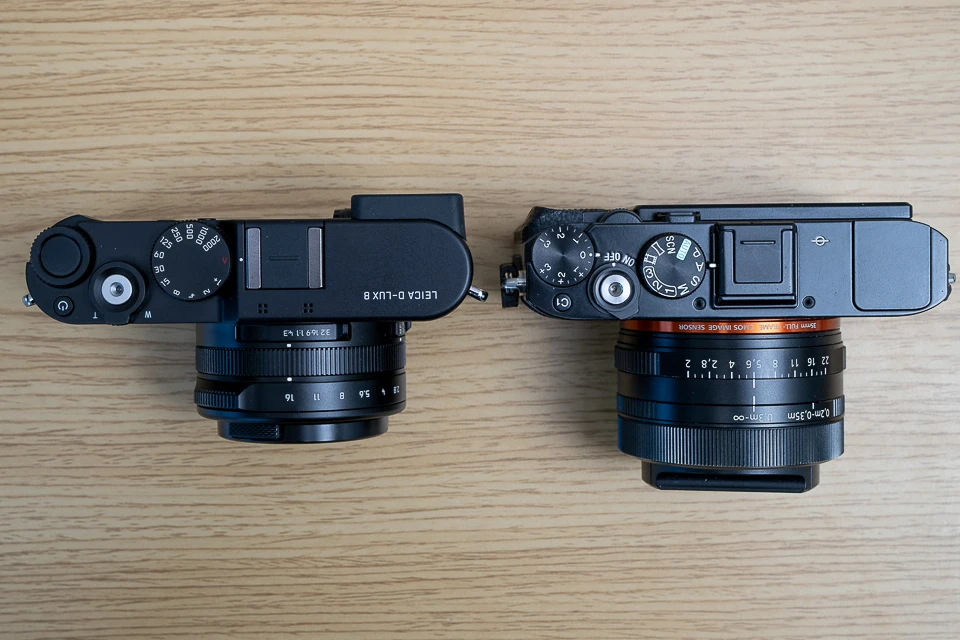 Leica D-Lux 8 vs Sony RX1R II, My favorite Fixed-lens Camera
Sensor and Lens
When we look at what could be considered the two most crucial elements of any camera—the sensor and the lens—the D-Lux 7 and 8 have exactly the same specifications. Clearly, Leica hasn’t touched these components so they could develop the camera swiftly.
 D-Lux 8 vs D-Lux 7
Although the body design and dimensions are generally the same, there are notable changes in the external physical controls and, more significantly, in the software and menu system. I’ll share these details with you in the following sections.
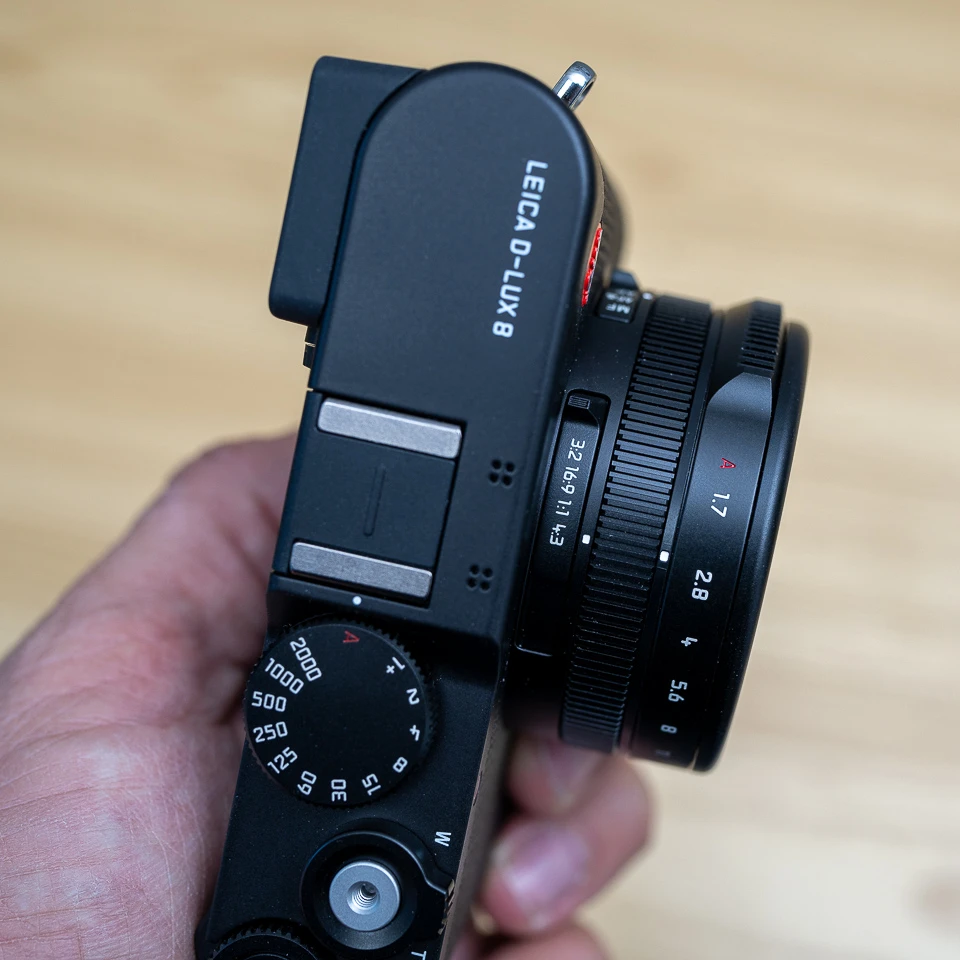 Leica D-Lux 8 Aspect Ratio Switch is too close to the body
The D-Lux 8 uses a multi-aspect sensor that offers 21 MP of resolution and is a bit smaller than typical MFT sensors. However, out of this 21 MP, only up to about 17 MP is actually utilized under the best circumstances. When you set the aspect ratio switch on the lens to 1:1, the total resolution drops to around 13 MP.
As you can see, in terms of resolution, it’s impossible for the D-Lux 8 to compete with cameras like the 40MP X100VI or the 60MP Leica Q3. I also don’t think Leica had any such claim in mind when they designed the D-Lux 8.
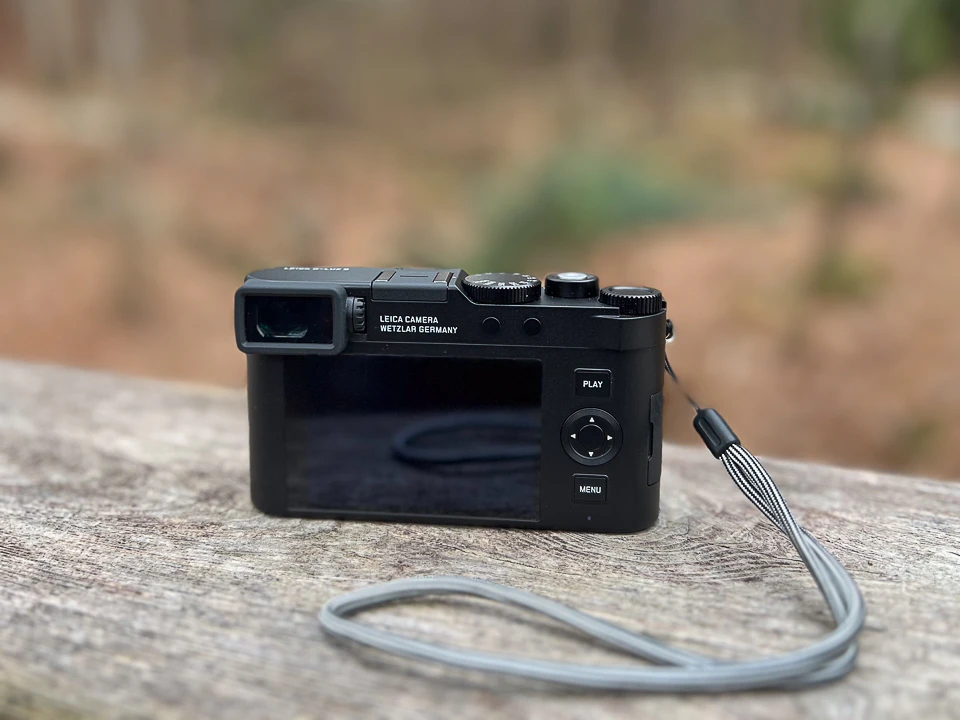 Leica D-Lux 8 Rear View
Use Case: Focal Flexibility
Where the D-Lux 8 shines or becomes appealing isn’t in its superior image quality but rather in the focal flexibility offered by its zoom lens, as well as its compact and lightweight build.
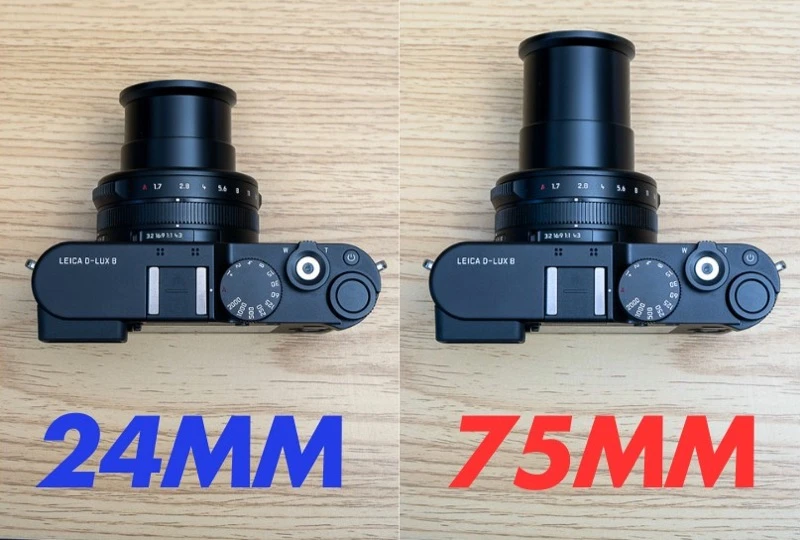 Leica D-Lux 8 Lens Extension at 24mm vs 72mm
The 24-75mm F1.7-2.8 lens undeniably provides excellent versatility for everyday use. When I take the D-Lux 8 with me as I head out the door, I don’t have the same concerns I have on days when I leave home with only a prime lens. I can confidently say that for the average user’s daily scenarios, 24-75mm comfortably covers most needs.
 Leica D-Lux 8 Dimensions
Portability and Ergonomics
Despite its small form factor, the D-Lux 8 is not quite small enough to fit comfortably in a pants pocket. However, it will easily fit into even the smallest camera bags. During the winter months when I tested it, I carried it in the pocket of my coat with no problems. As is the case with almost every small camera, the D-Lux 8 isn’t a powerhouse in terms of ergonomics. While the front surface has a kind of pattern, the rest of the camera body is smooth, with no finger grip. Even though it’s lightweight, you still feel the risk of the camera slipping out of your hand during use. The safest solution is to buy the Leica Handgrip for D-Lux 8, but its $150 price tag might discourage some people from going that route. I’d recommend checking out products by third-party manufacturers as well.
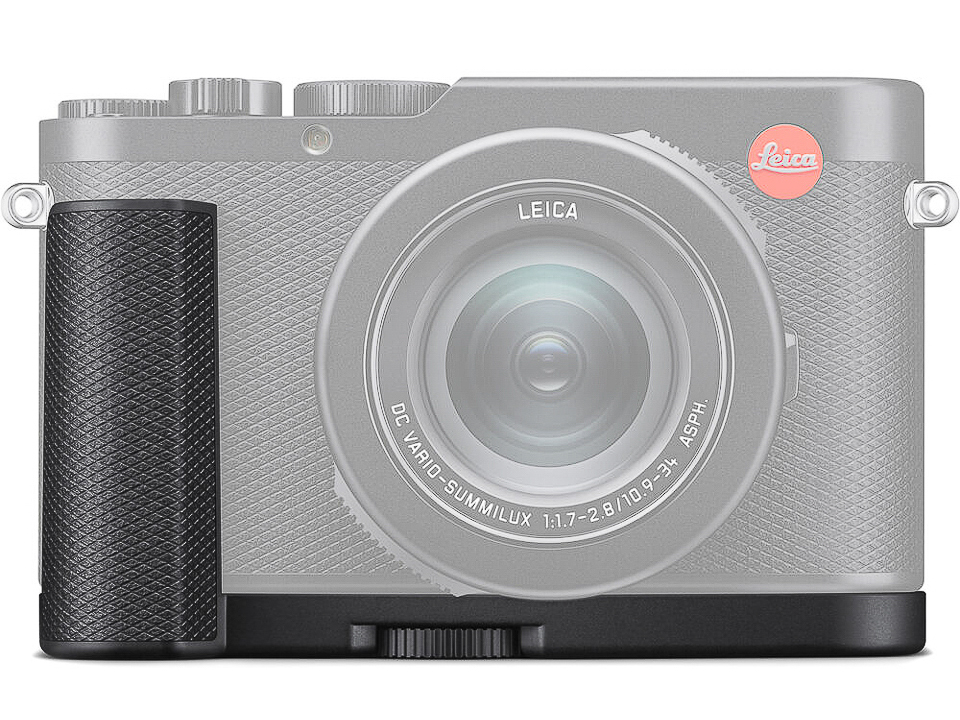 Leica D-Lux 8 Handgrip
It’s an interesting choice that Leica only includes a simple wrist strap instead of a neck strap in the D-Lux 8’s box. Because of the strap’s material, it doesn’t offer much grip, and it also didn’t inspire much confidence for me. A leather or similar material, or better yet, a neck strap, would have been more reassuring. To improve ergonomics, it might be worth trying Leica’s own D-Lux handgrip or third-party grips.
 Panasonic LX-3 was my favorite compact camera, still using occasionally for fun. It was basically same camera with the Leica D-Lux 4
From an ergonomic standpoint, the placement of the Af/mf/macro switch on the side of the lens and the aspect ratio selector on top of the lens can make usage a bit challenging—at least for people like me with thicker fingers—because these switches are situated very close to the camera body. It’s not bad to the point of being unusable, and you probably won’t be changing them too often anyway.
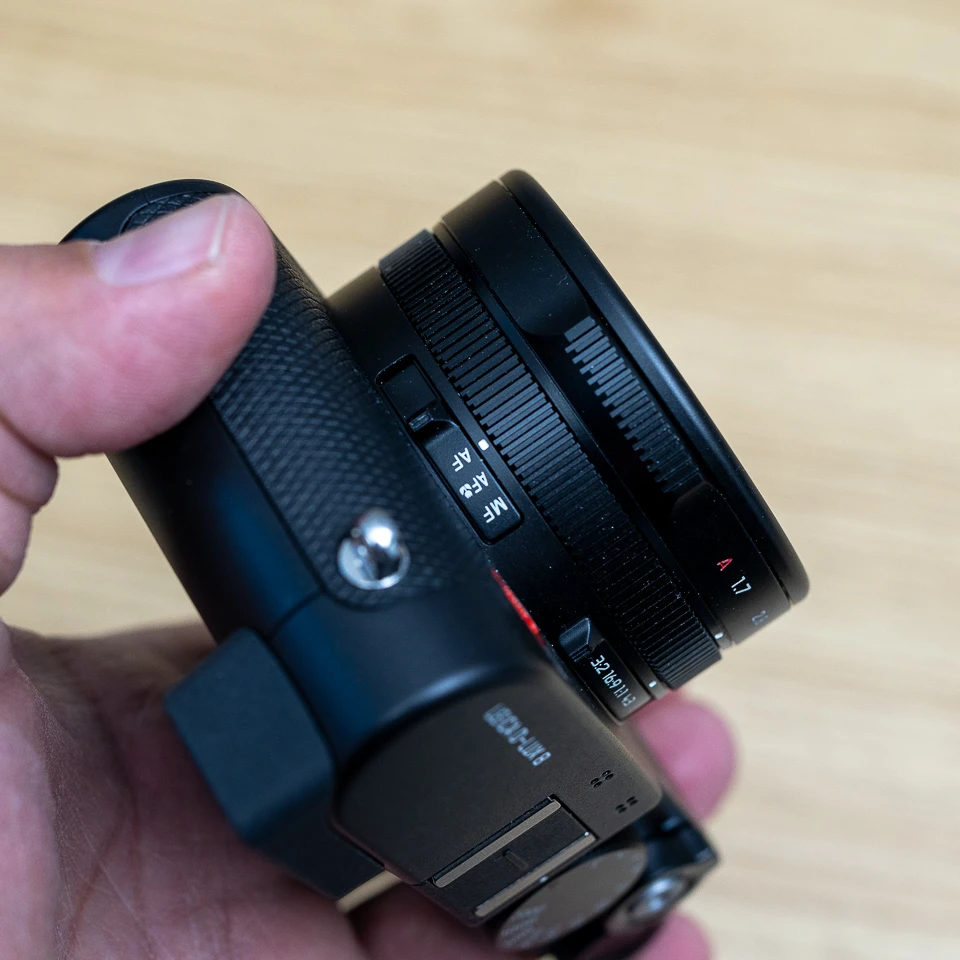 Leica D-Lux 8 Focus mode selection Switch is hard to change
On the top of the camera body, there’s a shutter dial, a zoom rocker, the shutter button, an on/off button, a customizable dial, and in its center, a button that can also be customized. Although the single-position on/off button looks modern, I’m not a big fan. You have to check the screen or the lens to see whether the camera is on or off because the on/off button itself doesn’t move to a different position.
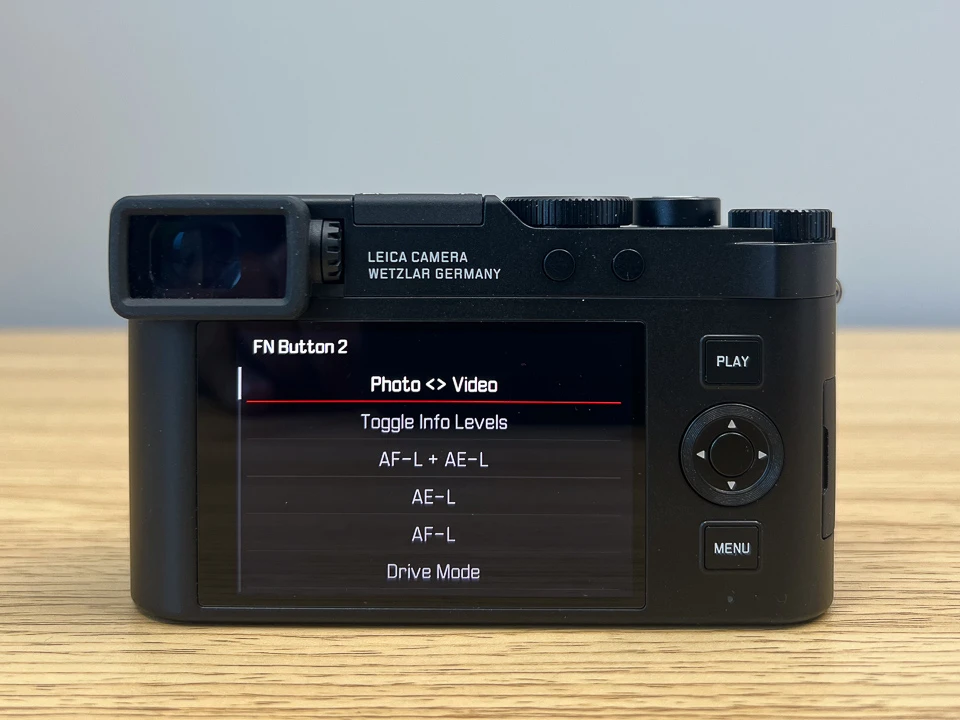 Customization of the buttons are very easy with the D-Lux 8
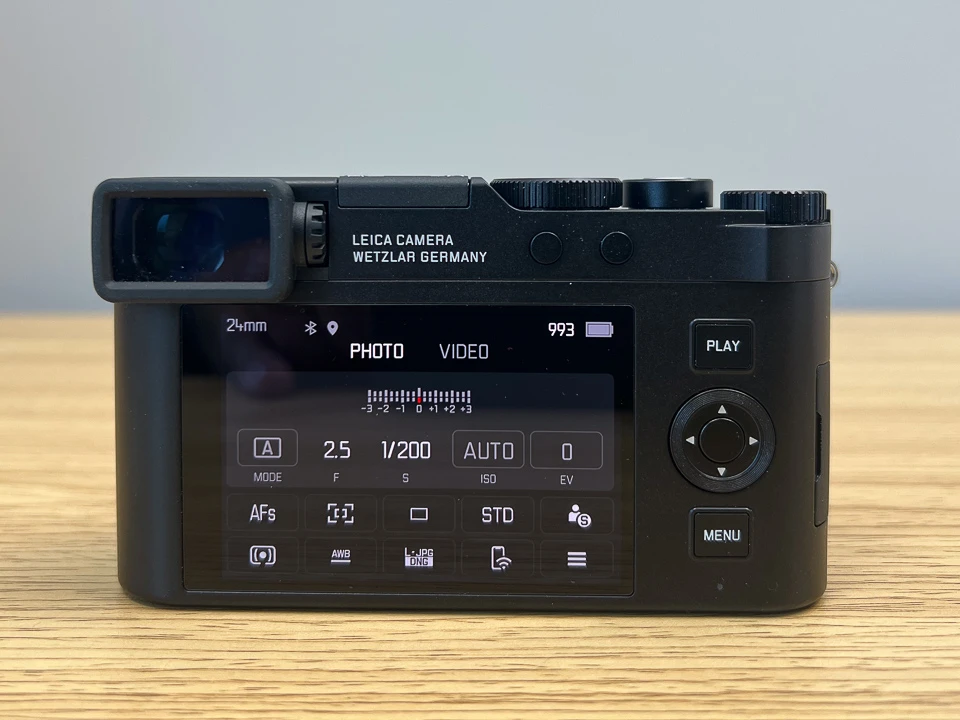 I liked the minimalistic approach Leica took with the D-Lux 8 Menu system
The programmable dial and button are well thought out—you can set them according to different memory modes. The rear layout of the camera is also quite minimalistic. The two top buttons have no markings on them, meaning you can assign any function you like. Programming them is easy, just as with the top button; you don’t have to dig into the menus. All you need to do is press and hold them for about one second, and a function list pops up on the screen, letting you pick what you want on the fly. In my opinion, this is a practical approach compared to getting lost in menus.
 Leica D-Lux 8 Top View
The physical control aspect I find most frustrating is related to the zoom rocker in front of the shutter button. The issue isn’t the placement or the usage per se, but that the zoom in and out operation is very slow. Zooming from 24mm to 75mm takes about two seconds, which feels like an eternity in a photographer’s world. You can definitely miss a shot because of it. The D-Lux 8 doesn’t offer a zoom memory option either; each time you turn the camera off and on again, it resets to 24mm, regardless of where you left off.
Another point: in the D-Lux 7, you could use the control ring on the lens to zoom, but for some reason, Leica removed this option on the D-Lux 8. Also, the Step Zoom feature that existed on the 7 is missing on the 8. That feature allowed you to jump directly between 24mm, 28mm, 35mm, and 50mm focal lengths, but it’s not available on the D-Lux 8.
One unfortunate limitation of the D-Lux 8 in certain environments is its lack of weather sealing. If you plan to use it in the rain or in dusty conditions, you’ll need to take additional precautions. Its compact size makes it somewhat easier to protect, but it’s still unnerving to know that your $1,600 camera could suddenly fail in such situations.
New OLED Viewfinder and Rear Screen
Another novelty on the D-Lux 8 is its updated OLED viewfinder. The 2.36 M-dot EVF is larger than the old one and provides good image quality overall. I can’t say it’s extremely bright, but as long as you press your eye against it to block out side light, it’s not problematic. However, if you wear glasses like I do, this becomes a bit more challenging.
I should also add that while I love viewfinders, and I don’t think they’re absolutely necessary on small cameras like this. Because of its light weight, I found myself using the rear screen most of the time—probably a result of spending so many years taking photos with smartphones, so it doesn’t feel strange anymore.
 Leica Q3 Tilting Screen
On the other hand, the fact that the rear screen is a fixed type annoyed me. If Leica had removed the viewfinder and made the rear screen tiltable, that would have been my preference—like on the Leica Q3, for instance. A simple up-and-down tilt is more than enough. It doesn’t have to be fully articulated, especially since I’m not into selfies or videos. Tilting screens draw less attention and seem sturdier to me, which clearly makes them more suitable for street photography.
 Low level shots are not easy to frame with the Leica D-lux 8 due to its fixed screen
The rear screen is 3 inches, and its brightness isn’t very high. It would be nice if it were brighter, but it’s not so dim that it’s unusable. On the plus side, the screen resolution is really good, and the touchscreen feature works great. You can use the touch functionality for menu navigation or to select your focus point. Leica seems to have designed the menus with touch in mind, making it very convenient to adjust settings.
24-75mm F1.7-2.8 Lens
Perhaps the most alluring part of the D-Lux 8 is its 24-75mm F1.7-2.8 lens. As mentioned before, this focal range is extremely practical for everyday use. Because of the relatively small sensor, you don’t have a lot of control over depth of field, so don’t expect very dramatic bokeh. But you can still create a pleasing effect by strategically placing your subject and background.
 D-Luc 8 at 24mm F1.7
When you switch to macro mode, you can get as close as 3cm to your subject, measured from the front element of the lens—meaning you risk bumping into your subject if you’re not careful. Leica hasn’t provided an official magnification ratio, but you can achieve a decent macro close-up effect.
 Macro at 24mm F2.8
 Macro at 24mm F1.7
You can set the aperture on the lens, or if you move the aperture selector to A, the camera automatically manages the aperture setting. There’s one interesting point worth mentioning if you’re not used to Leica’s approach: typically, an aperture ring is found on a lens that has a constant maximum aperture throughout its zoom range, but this lens does not have a fixed max aperture. So even if you set it to F1.7, as soon as you zoom in, the actual aperture at 75mm is F2.8, even if the lens still physically shows F1.7.
 Leica D-Lux 8 Lens Flare
Aperture values change roughly as follows, depending on the focal length:
- 24-27mm: F1.7
- 25-26mm: F1.8
- 27mm: F1.9
- 28mm: F2.0
- 29-31mm: F2.1
- 32-33mm: F2.2
- 34-36mm: F2.3
- 37-39mm: F2.4
- 40-42mm: F2.5
- 43-45mm: F2.6
- 46-51mm: F2.7
- 52-75mm: F2.8
When used wide open, the lens provides perfectly usable sharpness, but for the highest clarity, I’d recommend around F4.0. Even though Leica didn’t change the lens at all for the D-Lux 8—and it’s relatively old in design—it still delivers a satisfying level of image quality.
 Leica D-Lux 8 Sunstars at F2.8 ISO 1600 Unedited
The lens also has optical image stabilization. It’s not as effective as the latest lenses or cameras with IBIS, but compared to the conventional 1/focal length guideline, I’d estimate about a 2-stop advantage (though this isn’t a scientifically measured figure). Under the stabilization menu, you can choose On, Off, or Panning mode.
My only major gripe with the lens, as mentioned before, isn’t optical but operational: the zoom action is too slow.
Lens Cap
I recommend the Leica Auto lens cap, which eliminates the risk of losing your lens cap. However, its $90 price is quite steep. Instead of the original cap, you can also buy a third-party auto lens cap for under $15. It offers essentially the same functionality, but if you’re a Leica purist, you might shed a few tears over “diluting” the aesthetic.
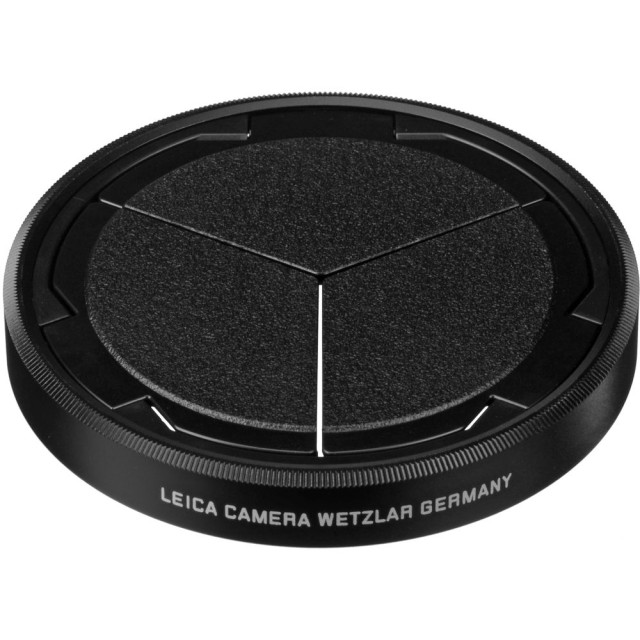 Leica Auto Lens Cap
One caveat: if you use the auto lens cap, you won’t be able to attach another filter. The lens has a 43mm filter thread. Since the D-Lux 8 doesn’t have a built-in ND filter, you’ll likely need an ND filter if you plan to shoot video with a wide-open aperture for a cinematic look, or a polarizer for certain types of photography.
Video Performance
To be honest, if you prioritize video, the D-Lux 8 might not be the right camera for you. While on paper it can record 4K 30p and FHD 60p, and the 24mm wide angle plus MFT-sized sensor initially seem promising, a closer look reveals some shortcomings. In 4K 30p, there’s about a 25% crop automatically applied, meaning your wide angle effectively becomes 30mm instead of 24mm. That’s often not wide enough for many scenarios.
Additionally, the D-Lux 8 lacks support for external microphones or headphones. The fixed rear screen also limits its usefulness for selfies or low-angle shots.
Because the sensor’s readout speed is relatively slow, there’s a noticeable and sometimes distracting rolling shutter effect in moving scenes. As I mentioned earlier, the D-Lux 8 is primarily a photography-focused camera; if you accept it as such, these video-related limitations won’t bother you too much.
Built-In Flash and External Flash Support
The D-Lux 8 doesn’t have a built-in flash, but Leica includes a small and cute external flash unit in the box, which is a considerate move. It comes in a little pouch, and it’s not hard to carry around if you wish. The flash is fixed, so you can’t tilt or bounce it, and it draws power from the camera’s battery (it doesn’t have its own), meaning you should be prepared for potentially rapid battery drain.
 Leica D-Lux 8 with the included On-camera Flash
Focusing
The D-Lux 8 relies on contrast detection for autofocus, lacking any phase detection features. This isn’t surprising given that Leica doesn’t seem to have made any improvements compared to the older model. Under single-shot AF conditions, as long as the ambient light level isn’t extremely low, the D-Lux 8 delivers fast and decisive focusing performance. However, when the light level drops, focusing slows down noticeably and can become quite indecisive.
You can change the focus point either through the touchscreen or by using the arrow keys on the D-pad. However, there’s no simple way to return the focus point to the center, which is incredibly frustrating. Manually getting the point exactly in the center is tedious; the only workaround I’ve found is switching focus modes—which forces the focus point back to the center—but that also takes time. On many cameras, you can double-tap or assign a button to re-center the focus point, but the D-Lux 8 lacks that option.
Shooting Speed
The D-Lux 8’s maximum burst rate is 11 fps, but achieving this speed requires sacrificing several things. At 11 fps, color depth drops to 10-bit, continuous autofocus (AF-C) is disabled (the focus point is locked), and there’s no live view between frames. To enable AF-C, 12-bit RAW, and live view between frames, you have to reduce the burst rate to 2 fps.
 Landscape in 16:9 Aspect Ratio
Image Quality
The D-Lux 8 isn’t a low-light powerhouse, and you shouldn’t expect it to be. It has an MFT-sized sensor, which also isn’t the latest technology—recall how Leica kept the same sensor from the 2018-era D-Lux 7. It can’t compete with the newer APS-C or full-frame sensors out there, but it’s still better than a smartphone or a small-sensor compact camera. I’d recommend staying below ISO 3200 for optimal results; any higher, and you lose a significant amount of detail. On the plus side, the fast F1.7-F2.8 lens and optical image stabilization help you keep ISO levels lower in many situations.
 Noise Levels from ISO 100 to ISO 12800
For the best results, it’s worth shooting in RAW. The D-Lux 8 uses the DNG file format for RAW, which is generally an advantage because DNG is almost universally recognized and usually doesn’t require special drivers for your computer.
Leica Fotos app
Leica is smaller than many of its Japanese rivals and is better known for mechanical precision than software prowess. Even so, the Leica Fotos app—compatible with many Leica cameras, including the D-Lux 8—is much more successful than many competing control apps. I used the iOS version and found it generally smooth. Bluetooth pairing is quick, and you can transfer photos and videos wirelessly. The app also offers remote control features, and firmware updates can be done directly through it. However, I suspect this app connection might cause a certain operational issue, which I’ll discuss later in the “operational speed” section.
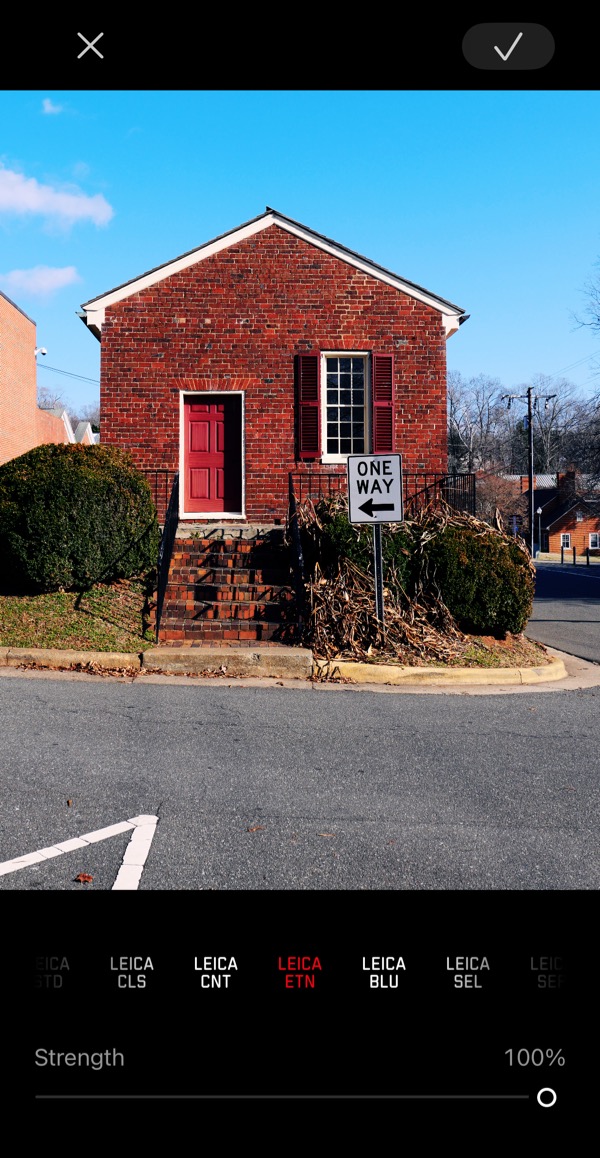 Leica Fotos App comes Leica Look filters
Memory and Battery
The D-Lux 8 supports UHS-II type SD cards, whereas the D-Lux 7 was UHS-I only. I tested the 8 with both card types and didn’t see any difference in buffer clearing time. So, more affordable UHS-I cards should suffice.
Leica hasn’t officially stated the battery life for the D-Lux 8, but considering the D-Lux 7 has a CIPA rating of about 340 shots, you can assume the D-Lux 8 gets around 300 shots per charge. That’s normal for a camera in this class, but for longer outings, I’d recommend getting at least one spare battery. Leica’s original BP-DC15 batteries cost around $140, so I can’t wholeheartedly recommend them to anyone. You might want to look at a few more affordable third-party options.
 Leica BP-DC15 Battery
One good thing is that the D-Lux 8 now has a USB-C port for charging. However, the camera only charges when it’s turned off—powering it on immediately stops the charging process. Another point to note is that Leica doesn’t include a battery charger or cable in the box.
Operational Speed
The D-Lux 8 powers on quickly enough, especially considering the lens has to extend before you can shoot. However, there’s a problem when you power it off. If the “Connectivity” feature is turned on and you’ve previously paired the camera with the Leica Fotos app on your phone, the camera can sometimes take an incredibly long time to shut down—occasionally up to 10 seconds—which is unacceptable. Interestingly, this doesn’t happen every time, so I suspect it’s a bug. If you turn off connectivity, the camera shuts down in a reasonably short time, thankfully.
If you don’t plan to use mobile connectivity, I recommend keeping the connection features turned off. This will also help the battery last longer.
The camera’s responsiveness is fast—menus, buttons, and the shutter react quickly with minimal lag. I didn’t experience any major slowdowns during shooting. However, when using the touch screen, sometimes it fails to register my taps on the bottom of the screen (like menu items at the very bottom). To avoid this issue, I have to press down harder than I normally would. I initially thought the bottom portion of the screen was less sensitive than the rest, yet when selecting focus points on the bottom area, I didn’t have this issue. I’m not sure how to explain that discrepancy.
Shooting Experience
I realize the earlier parts of my review highlight a lot of negatives, but once you pick up the D-Lux 8 and head outside, you tend to forget all those small details. With ILC cameras, I often wonder which lens to bring along, but thanks to this camera’s nature, I don’t have that dilemma. It’s got a 24-75mm lens, and you’re always ready to shoot. Because it’s compact, it’s not a burden to carry around. When you pull it out of your pocket or bag, it doesn’t attract much attention. If you raise a large mirrorless camera to your eye, people around you often notice and start acting differently, but the D-Lux 8 draws no more attention than a smartphone.
Technically speaking, there’s no doubt that cameras like the Fujifilm X100VI, Ricoh GR III, or Leica Q3 / Q3 43 are more advanced. In the right conditions, they can produce better photos than the D-Lux 8. However, none of them can match the flexibility provided by the D-Lux 8’s zoom lens.
Rivals and Alternatives
While Leica is essentially repackaging some relatively dated tech, we must admit that in the D-Lux 8’s category, there aren’t many brand-new cameras being sold these days. I can’t think of another camera that combines a zoom lens, an MFT or larger sensor, a decent viewfinder and rear screen, modern mobile app support, and sufficient physical controls. The Sony RX100 series offers similar features—often more advanced in many areas—plus it’s smaller and lighter, but it has a 1" sensor, and its design doesn’t always inspire the same kind of user experience.
 Leica D-Lux 8 vs Sony RX100 VII with 1-inch Sensor and 24-200 mm F2.8-4.5 Zoom Lens
Another alternative is pairing a small mirrorless body with a small kit lens. You can build a pretty decent setup for around $1600. However, recently all manufacturers have been making mirrorless cameras larger, and since they prioritize more expensive and bigger models, there’s far less variety than before. Cameras like the Panasonic GM1/5 are unfortunately no longer available. My “beater camera”, a Sony a5100 with a 16–50mm kit lens, is another possibility. It lacks a viewfinder but does have a tilting screen, and its APS-C sensor is good in low light. The lens is tiny but optically weak—still, it gets the job done. Nevertheless, I doubt people considering a brand-new Leica like the D-Lux 8 will be inclined to go for a setup like that.
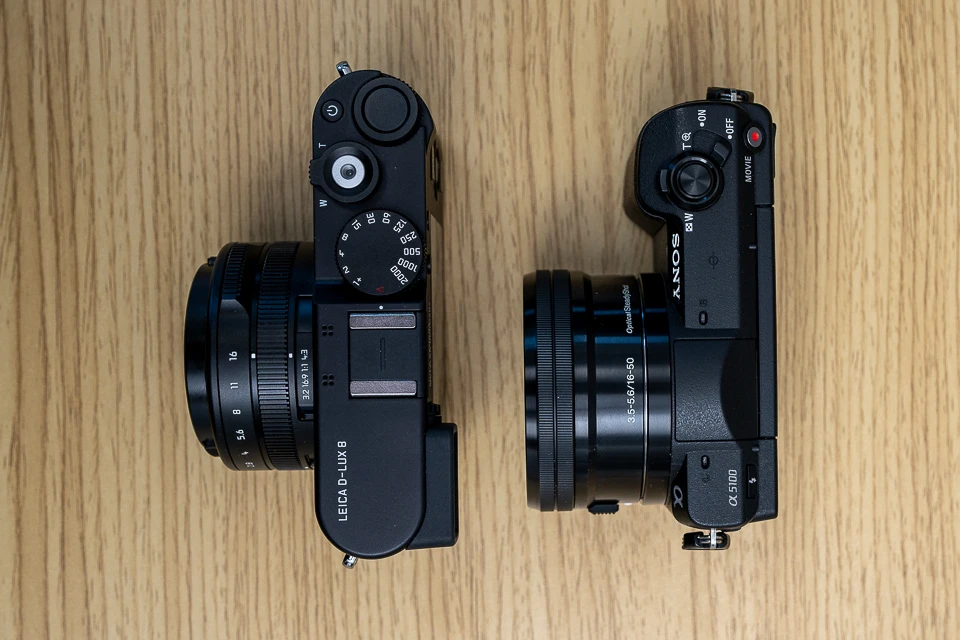 Leica D-Lux 8 vs Sony A5100 with the E 16-50mm F3.5-5.6 Kit Lens
Conclusion and Assessment
Overall, if you look at the D-Lux 8 in its own class, I believe that despite its minor flaws, it’s practically unrivaled. Leica has done a great job diversifying its lineup both functionally and price-wise while also offering a lifestyle element, and the D-Lux 8 is a perfect example of that. In terms of cost, it’s the least expensive Leica camera. The D-Lux 8 is ideal for those who aren’t chasing technical perfection but want to carry a camera everywhere, aren’t satisfied with smartphone photos, and appreciate both reliability and style.
Regarding its relatively high price, it’s worth noting that Leica cameras, much like Apple products, tend to hold their value better than their competitors on the second-hand market. If you can find one in stock, I recommend trying it out.
Who It’s For
- Photographers who want a compact yet versatile camera, primarily for still photography.
- Those who value Leica’s design, brand cachet, and build quality, and are willing to accept a higher price for those attributes.
- Users seeking a zoom range that covers most everyday situations without needing multiple lenses.
Who Should Look Elsewhere
- Videographers or those needing advanced video features (external mic support, tilt screen, minimal crop).
- Photographers who want phase-detection AF for faster focus in low light or action shots.
- Those who need extended battery life and prefer not to buy multiple batteries or keep connectivity off.
Pros and Cons
Pros
-
Compact Zoom Lens (24–75mm F1.7–2.8): Offers versatile focal lengths for daily use, eliminating the worry of having the wrong lens for various scenarios. Fast aperture range helps keep ISO low in many situations.
-
Multi-Aspect Sensor: Provides flexibility with aspect ratios. Although not as high-resolution as some rivals, it still outperforms smaller-sensor compacts or smartphones.
-
Physical Controls and Customization: Top dial and customizable buttons allow for quick function changes. Press-and-hold functionality makes it easy to remap buttons without diving into complex menus.
-
Updated OLED Viewfinder: Larger and clearer than the previous model’s EVF. Provides a good view (though not extremely bright) and is workable in most conditions.
-
Solid Leica Build and Brand Value: Maintains Leica’s renowned mechanical and design quality. Tends to retain resale value better than many competitors.
-
Leica Fotos App and Connectivity: Generally smooth Bluetooth pairing and the ability to transfer photos/videos wirelessly. Firmware updates can be done directly through the app.
-
Portability and Discreetness: Compact design doesn’t draw too much attention when shooting, compared to larger mirrorless setups. Easy to carry around in a coat pocket or small camera bag.
-
Included External Flash: Leica includes a small external flash in the box, adding some flexibility for low-light situations.
-
USB-C Charging: Modern port makes charging more convenient (though only when the camera is off).
Cons
-
Slow Zoom Action: Zooming from 24mm to 75mm takes about two seconds, risking missed shots. No zoom memory—resets to 24mm each time the camera is turned off.
-
Fixed Rear Screen: Not tiltable or fully articulated, limiting certain shooting angles (e.g., selfies, low angles). Makes video and creative compositions a bit less convenient.
-
Limited Video Capabilities
- 4K 30p applies a ~25% crop (24mm effectively becomes ~30mm).
- No external microphone or headphone support.
- Noticeable rolling shutter due to slow sensor readout.
-
Contrast-Only Autofocus: No phase-detection AF; slows down in low light
-
Ergonomic Drawbacks: Smooth body with minimal grip; easy to feel like it could slip. Switches (AF/MF/Macro, aspect ratio) are very close to the body, awkward for those with larger fingers.
-
Viewfinder and Screen Brightness: EVF not extremely bright, may be challenging for glasses wearers. Rear screen brightness could be better for strong daylight conditions.
-
Some Missing Lens Features (Compared to D-Lux 7): No lens ring zoom option. Step Zoom (24mm/28mm/35mm/50mm presets) removed in the new model.
-
Battery Life and Accessories: Estimated ~300 shots per charge (a spare battery is recommended), and original Leica batteries are expensive (~$140). Camera only charges via USB-C when turned off. No battery charger or cable included in the box.
-
Operational Bugs with Connectivity: Camera can take up to 10 seconds to shut down if “Connectivity” is on and paired with the app. Turning connectivity off fixes it but means losing easy remote access/file transfers.
-
No Weather Sealing
What is in the Box?
- Leica D-Lux 8 Digital Camera
- On-Camera Flash
- Lens Cap
- Hand Strap
- Leica BP-DC 15 Lithium-Ion Battery (7.2V, 1025mAh)
- Limited 2-Year Manufacturer Warranty
Leica D-Lux 8 Key Specs
- Announcement Date: 2024-05-23
- 17MP - Four Thirds CMOS Sensor
- ISO 200 - 25600 ( expands to 100)
- 24-75 mm F1.7-2.8 Zoom Lens
- Optical Image Stabilization
- 3.00" Fixed Type Screen
- 2760k dot Electronic viewfinder
- 11.0fps continuous shooting
- 4K (UHD) - 3840 x 2160 video resolution
- Built-in Wireless
- 397g. 120 x 69 x 62 mm
- Read the Review
- Check Price at: Amazon, B&H Photo
