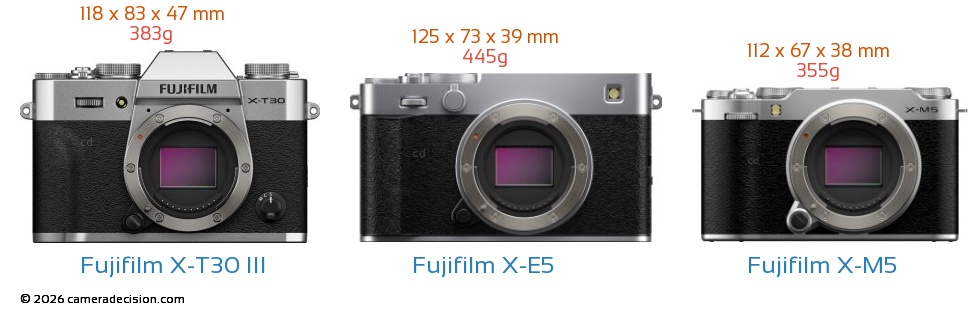
 Fujifilm X-T30 III vs Fujifilm X-E5 vs Fujifilm X-M5 Front View Size Comparison
Fujifilm released firmware updates for its X-E5, X-M5, and X-T30 III X_mount mirrorless cameras. You can find the details of the changes as well as the download links below. If you are curious about how these three cameras differ, check the comparison table at the end of this post.
Fujifilm X-E5 ver. 1.12 – Download
The firmware update Ver.1.12 from Ver.1.11 incorporates the following issue:
- Minor bugs have been fixed.
Fujifilm X-M5 ver. 1.30 – Download
The firmware update Ver.1.30 from Ver.1.20 incorporates the following issues:
Regarding the details of No.1 download the “X-M5 New Features Guide[Ver.1.30]” from our website.
・X-M5 New Features Guide: English, Français, Deutsch, Español, Italiano, Nederland, Polski, Svenska, Norsk, Dansk, Pусский, Suomi, 中文简, 中文繁體, 한국어, ภาษาไทย, Arabic
- instax™ series pairing registration and printing supports.
(1) Smartphone printer Link series, Hybrid camera instax Evo series and instax LiPlay series are added to the supported printers, so that you can transfer your favorite images and print them by pairing your camera.
.
Note: Be sure to update the instax™ series firmware to the latest version before connecting the instax™ series to a camera.
.
(2) “instax PRINTER PRINT” function is added to the Playback menu, so that you can select images to print on the instax™ series and adjust the cropping position before printing.(3) “instax DIRECT PRINT” function is added to “BUTTON/DIAL SETTING” in the Setup menu, so that you can jump directly to the print start screen for the image currently displayed in the Playback menu, and print it easily by pressing the button assigned to this function as follows.
[Operation flow to assign “instax DIRECT PRINT”] [Setup menu] → [BUTTON/DIAL SETTING] → [REC BUTTON SETTING] → [instax DIRECT PRINT](4) “NETWORK/USB SETTING” in the Setup menu or “instax IMAGE QUALITY MODE” in the Playback menu is added, so that you can select the image quality settings below for printing to the instax™ series.
[Image quality settings]
- instax-Rich Mode: Print with rich color expression.
- instax-Natural Mode: Print with conventional image quality.
- Print count display for the instax™ series with the “FUJIFILM XApp”.
The number of prints made with the instax™ series is displayed in the “instax PRINT COUNT” of the “FUJIFILM XApp”.
.
Note: Be sure to update the “FUJIFILM XApp” application software to Version 2.7.5 to enable this feature.
.
- Other minor bug fixes.
Several minor firmware bugs are fixed.
Fujifilm X-T30 III ver. 1.10 – Download
The firmware update Ver.1.10 from Ver.1.01 incorporates the following issues:
Regarding the details of No.1 download the “X-T30 III New Features Guide[Ver.1.10]” from our website.
・X-T30 III New Features Guide: English, Français, Deutsch, Español, Italiano, Nederland, Polski, Svenska, Norsk, Dansk, Pусский, Suomi, 中文简, 中文繁體, 한국어, ภาษาไทย, Arabic
- instax™ series pairing registration and printing supports.
(1) Hybrid camera instax Evo series and instax LiPlay series are added to the supported printers, so that you can transfer your favorite images and print them by pairing your camera.
.
Note: Be sure to update the instax™ series firmware to the latest version before connecting the instax™ series to a camera.
.
(2) “instax DIRECT PRINT” function is added to “BUTTON/DIAL SETTING” in the Setup menu, so that you can jump directly to the print start screen for the image currently displayed in the Playback menu, and print it easily by pressing the button assigned to this function as follows.[Operation flow to assign “instax DIRECT PRINT”] [Setup menu] → [BUTTON/DIAL SETTING] → [Fn BUTTON SETTING] → [instax DIRECT PRINT](3) “NETWORK/USB SETTING” in the Setup menu or “instax IMAGE QUALITY MODE” in the Playback menu is added, so that you can select the image quality settings below for printing to the instax™ series.
[Image quality settings]
- instax-Rich Mode: Print with rich color expression.
- instax-Natural Mode: Print with conventional image quality.
- Print count display for the instax™ series with the “FUJIFILM XApp”.
The number of prints made with the instax™ series is displayed in the “instax PRINT COUNT” of the “FUJIFILM XApp”.
.
Note: Be sure to update the “FUJIFILM XApp” application software to Version 2.7.5 to enable this feature.
.
- Other minor bugs fixes.
Several minor firmware bugs are fixed.
Fujifilm X-T30 III vs Fujifilm X-E5 vs Fujifilm X-M5 Comparison Table
| FEATURE and SPECS COMPARISON | |  |  |  |
| Model | Fujifilm X-E5 | Fujifilm X-M5 | Fujifilm X-T30 III |
| Sensor Resolution | 40.0 MP | 26.0 MP | 26.0 MP |
| Announced Date | 2025-06-12 | 2024-10-14 | 2025-10-23 |
| Camera Type | Entry-Level Mirrorless | Entry-Level Mirrorless | Entry-Level Mirrorless |
| Sensor Type | X-Trans CMOS | X-Trans CMOS 4 | X-Trans CMOS |
| Sensor Size | APS-C | APS-C | APS-C |
| Sensor Sensitivity | ISO 125 - 12800( expands to 64-51200) | ISO 160 - 12800( expands to 80 - 51200) | ISO 160 - 12800( expands to 80 - 51200) |
| Lens Mount | Fujifilm X | Fujifilm X | Fujifilm X |
| Image Stabil. | Sensor-shift ( up to 7.0 stops) | Digital only | No |
| Eye Tracking Focus | | | |
| Weight | 445g | 355g | 383g |
| Dimensions | 125 x 73 x 39mm | 112 x 67 x 38mm | 118 x 83 x 47mm |
| Focus Points | 425 | 425 | 425 |
| Animal Eye Tracking | | | |
| Focus Bracket | | | |
| Minimum Shutter | 4 sec | 900 sec | 900 sec |
| Maximum Shutter | 1/4000sec | 1/4000sec | 1/4000sec |
| Maximum Shutter Electronic | 1/180000 sec | 1/32000 sec | 1/32000 sec |
| Continuous Drive | 8.0fps | 8.0fps | 8.0fps |
| Built-in Flash | | | |
| Max Video Reso | 6240 x 4160 | 6240 x 4160 | 6240 x 4160 |
| Video fps at Max | 30p,25p,24p | 30p,25p,24p,23.98p | 30p,25p,24p,23.98p |
| Video Formats | MPEG-4, H.264, H.265 | MPEG-4, H.264, H.265 | MPEG-4, H.264, H.265 |
| High Speed Video | 120fps | 240fps | 240fps |
| Storage Slot | 1 | 1 | 1 |
| UHS Support | UHS-I | UHS-I | UHS-I |
| Battery Life | 305 | 330 | 380 |
| Battery Model | NP-W126S | NP-W126S | NP-W126S |
| RAW Video | | | |
| Webcam | | | |
| Anti Flicker | | | |
| Microphone Port | | | |
| Headphone Port | | | |
| Wifi | | | |
| Timelapse | | | |
| Screen Type | Tilting | Fully Articulated | Tilting |
| LCD Size | 3.00" | 3.00" | 3.00" |
| Screen dots | 1040000 | 1040000 | 1620000 |
| Touch Screen | | | |
| Viewfinder | | | |
| Selfie Friendly Screen | | | |
| AF Joystick | | | |
| Bluetooth | | | |
| Vehicle Tracking | | | |
| Price | Amazon, B&H Photo | Amazon, B&H Photo | Amazon, B&H Photo |
