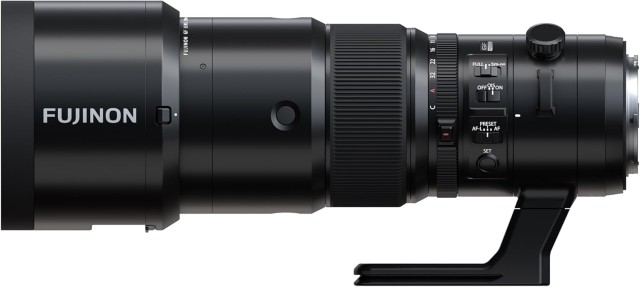
 Fujifilm GF 500mm F5.6 R LM OIS WR is the longest lens for the G Mount
Fujifilm has released numerous firmware updates for all of its medium format Fujifilm G series cameras and some G-Mount lenses including the latest GF 500mm F5.6 R LM OIS WR super-telephoto which is my favorite lens for this mount.
Important: When upgrading your lens firmware, update your camera body to the latest firmware first and then perform the firmware upgrade for the interchangeable lenses.
Cameras
Fujifilm GFX100II ver. 2.21 (Download here)
The firmware update Ver.2.21 from Ver.2.20 incorporates the following issues:
- When the GF50mm/GF35-70mm lens is attached to the camera body and the lens firmware is updated, in rare cases, “LENS ERROR” occurs during the firmware update and the lens stops moving. This revised firmware automatically quits the update to prevent the lens from malfunctioning when detecting the updating error.
Note-1:To enable the above fix, update the camera’s firmware to the latest version before updating the lens firmware.
Note-2:The firmware download for GF50mmF3.5 R LM WR and GF35-70mmF4.5-5.6 WR will be available after this firmware is released.
Note-3:For details, refer to the “FUJINON LENS GF50mmF3.5 R LM WR & GF35-70mmF4.5-5.6 WR firmware download resumption”
- When the shutter button is half-pressed at the same time as the “AF ILLUMINATOR” light metering operation, the camera freezes in rare cases.
- The camera freezes in rare cases while recording movie with an external monitor connected under the following conditions.
[Setting conditions]
・MOVIE MODE:4K 16:9/59.94P
・MEDIA REC SETTING:H.264/422 MOV
・IS MODE (MOVIE):IBIS/OIS+DIS
・HDMI OUTPUT SETTING:HDMI OUTPUT INFO DISPLAY ON
- Image stabilization does not work in rare cases when shooting movies with GF45-100mmF4 R LM OIS WR attached.
- A minor bug.
Fujifilm GFX100S II ver. 1.01 (Download)
The firmware update Ver.1.01 from Ver.1.00 incorporates the following issues:
- When the GF50mm/GF35-70mm lens is attached to the camera body and the lens firmware is updated, in rare cases, “LENS ERROR” occurs during the firmware update and the lens stops moving. This revised firmware automatically quits the update to prevent the lens from malfunctioning when detecting the updating error.
Note-1:To enable the above fix, update the camera’s firmware to the latest version before updating the lens firmware.
Note-2:The firmware download for GF50mmF3.5 R LM WR and GF35-70mmF4.5-5.6 WR will be available after this firmware is released.
Note-3:For details, refer to the “FUJINON LENS GF50mmF3.5 R LM WR & GF35-70mmF4.5-5.6 WR firmware download resumption”
- A firmware bug is fixed that the minor noise sometimes appears on the image depending on the subject when RAW images were processed by image processing software to emphasize image quality-related corrections.
- A firmware bug is fixed that the false coloration on the edges of text in rare cases when shooting the fine text, such as a text chart and enlarging this text for display.
- When the shutter button is half-pressed at the same time as the “AF ILLUMINATOR” light metering operation, the camera freezes in rare cases.
- Image stabilization does not work in rare cases when shooting movies with GF45-100mmF4 R LM OIS WR attached.
- A minor bug.
Fujifilm GFX100S ver. 2.12 (Download)
The firmware update Ver.2.12 from Ver.2.11 incorporates the following issues:
- When the GF50mm/GF35-70mm lens is attached to the camera body and the lens firmware is updated, in rare cases, “LENS ERROR” occurs during the firmware update and the lens stops moving. This revised firmware automatically quits the update to prevent the lens from malfunctioning when detecting the updating error.
Note-1:To enable the above fix, update the camera’s firmware to the latest version before updating the lens firmware.
Note-2:The firmware download for GF50mmF3.5 R LM WR and GF35-70mmF4.5-5.6 WR will be available after this firmware is released.
Note-3:For details, refer to the “FUJINON LENS GF50mmF3.5 R LM WR & GF35-70mmF4.5-5.6 WR firmware download resumption”
- A firmware bug is fixed that the area settings in some regions are not automatically updated when connecting the camera to the “FUJIFILM XApp” to synchronize time.
Note: FUJIFILM XApp, Ver.2.0.3, for iOS & Android are now available
- Image stabilization does not work in rare cases when shooting movies with GF45-100mmF4 R LM OIS WR attached.
- A minor bug.
Fujifilm GFX50SII ver. 2.12 (Download)
The firmware update Ver.2.12 from Ver.2.11 incorporates the following issues:
- When the GF50mm/GF35-70mm lens is attached to the camera body and the lens firmware is updated, in rare cases, “LENS ERROR” occurs during the firmware update and the lens stops moving. This revised firmware automatically quits the update to prevent the lens from malfunctioning when detecting the updating error.
Note-1:To enable the above fix, update the camera’s firmware to the latest version before updating the lens firmware.
Note-2:The firmware download for GF50mmF3.5 R LM WR and GF35-70mmF4.5-5.6 WR will be available after this firmware is released.
Note-3:For details, refer to the “FUJINON LENS GF50mmF3.5 R LM WR & GF35-70mmF4.5-5.6 WR firmware download resumption”
- A firmware bug is fixed that the area settings in some regions are not automatically updated when connecting the camera to the “FUJIFILM XApp” to synchronize time.
Note: FUJIFILM XApp, Ver.2.0.3, for iOS & Android are now available
- Image stabilization does not work in rare cases when shooting movies with GF45-100mmF4 R LM OIS WR attached.
- A minor bug.
Fujifilm GFX100 ver. 5.11 (Download)
The firmware update Ver.5.11 from Ver.5.10 incorporates the following issues:
- When the GF50mm/GF35-70mm lens is attached to the camera body and the lens firmware is updated, in rare cases, “LENS ERROR” occurs during the firmware update and the lens stops moving. This revised firmware automatically quits the update to prevent the lens from malfunctioning when detecting the updating error.
Note-1:To enable the above fix, update the camera’s firmware to the latest version before updating the lens firmware.
Note-2:The firmware download for GF50mmF3.5 R LM WR and GF35-70mmF4.5-5.6 WR will be available after this firmware is released.
Note-3:For details, refer to the “FUJINON LENS GF50mmF3.5 R LM WR & GF35-70mmF4.5-5.6 WR firmware download resumption”
- A firmware bug is fixed that the area settings in some regions are not automatically updated when connecting the camera to the “FUJIFILM XApp” to synchronize time.
Note: FUJIFILM XApp, Ver.2.0.3, for iOS & Android are now available
- Image stabilization does not work in rare cases when shooting movies with GF45-100mmF4 R LM OIS WR attached.
- A minor bug.
Fujifilm GFX50S ver. 4.51 (Download)
The firmware update Ver.4.51 from Ver.4.50 incorporates the following issue:
- When the GF50mm/GF35-70mm lens is attached to the camera body and the lens firmware is updated, in rare cases, “LENS ERROR” occurs during the firmware update and the lens stops moving. This revised firmware automatically quits the update to prevent the lens from malfunctioning when detecting the updating error.
Note-1:To enable the above fix, update the camera’s firmware to the latest version before updating the lens firmware.
Note-2:The firmware download for GF50mmF3.5 R LM WR and GF35-70mmF4.5-5.6 WR will be available after this firmware is released.
Note-3:For details, refer to the “FUJINON LENS GF50mmF3.5 R LM WR & GF35-70mmF4.5-5.6 WR firmware download resumption”
Fujifilm GFX50R ver. 3.11 (Download)
The firmware update Ver.3.11 from Ver.3.10 incorporates the following issues:
- When the GF50mm/GF35-70mm lens is attached to the camera body and the lens firmware is updated, in rare cases, “LENS ERROR” occurs during the firmware update and the lens stops moving. This revised firmware automatically quits the update to prevent the lens from malfunctioning when detecting the updating error.
Note-1:To enable the above fix, update the camera’s firmware to the latest version before updating the lens firmware.
Note-2:The firmware download for GF50mmF3.5 R LM WR and GF35-70mmF4.5-5.6 WR will be available after this firmware is released.
Note-3:For details, refer to the “FUJINON LENS GF50mmF3.5 R LM WR & GF35-70mmF4.5-5.6 WR firmware download resumption”
- A firmware bug is fixed that the area settings in some regions are not automatically updated when connecting the camera to the “FUJIFILM XApp” to synchronize time.
Note: FUJIFILM XApp, Ver.2.0.3, for iOS & Android are now available
- A minor bug.
Lenses
Fujinon GF50mmF3.5 ver.1.10 (Download)
The firmware update Ver.1.10 from Ver.1.00 incorporates the following issues:
Firmware download of the GF50mmF3.5 R LM WR (Ver. 1.10) resumed on July 9, 2024.
When upgrading, please update your camera body to the latest firmware and then perform the firmware upgrade for the interchangeable lenses.
- Aperture control parameters have been optimized to improve exposure tracking during movie taking.
- Focusing motor noise during movie taking has been reduced.
Fujinon GF35-70mmF4.5-5.6 ver. 1.10 (Download here
The firmware update Ver.1.10 from Ver.1.00 incorporates the following issue:
The firmware download of GF35-70mmF4.5-5.6 WR (Ver. 1.10) resumed on July 9, 2024.
When upgrading, please update your camera body to the latest firmware and then perform the firmware upgrade for the interchangeable lenses.
- Aperture control parameters have been optimized to improve exposure tracking during movie taking.
Fujinon GF500mmF5.6 ver.1.01 (Download)
The firmware update Ver.1.01 from Ver.1.00 incorporates the following issue:
- A minor bug.
